


Executive Summary
No single B2B store platform is best for a catalog chatbot, because the right one depends on your catalog shape, pricing rules, team, and budget. This guide treats B2B platforms for catalog chatbot use as a decision, not a ranking.
An AI catalog assistant needs four things from the store: specs in fields, buyer-specific prices, API access, and a quote handoff. Shopify, BigCommerce, WooCommerce, and Magento each cover those needs in different ways.
An assistant works best on clean, structured product data. If specs, prices, or stock are not in the store in a readable form, it cannot answer from them. So the foundation comes first and the answer layer comes second.
Introduction
It is 9 PM. A buyer types an exact part number and one spec into your store search.
The store returns a page of near matches. The specs hide inside long descriptions, and the price on screen is list price, though her account has a contract price. She closes the tab.
The weak link was not a missing chat window. It was what the store could hand over. For the basics of the category, read the B2B catalog chatbot guide.
This article compares four platforms on four needs, and it names no winner. A broader look at all four platforms, outside the catalog question, sits in an ecommerce platforms comparison.
What does a catalog chatbot need from a store platform?
It needs four things from the store. Specs in fields. The right price for each buyer. A way to read the catalog and hear about changes. A place to send the quote. Each one is a fact about the platform, not about the chat.
- Specs in fields. Part numbers, sizes, materials, and ratings sit in their own fields, not in one long description.
- Customer-specific price rules. The assistant can ask for the price this company sees, not only list price.
- API access and webhooks. An API is the door a tool uses to read your catalog. A webhook is a message the store sends when a product changes.
- A quote handoff. The request lands where your team looks, such as email, a CRM, a draft order, or a native quote object.
Now the honest limit. An assistant can only be as good as the data it reads. It works best on clean, structured product data.
If specs, prices, or stock are not in the store in a readable form, the assistant has nothing to answer from. So the order is foundation first, answer layer second. The cleanup work itself is covered in the catalog readiness checklist.
This guide skips that work. It asks a different question. Which platform hands the assistant what it needs?
How do Shopify, BigCommerce, WooCommerce, and Magento compare?
All four can feed a catalog assistant, but they hand over price rules, fields, and events in different ways. The table below comes from each platform’s own documentation. Read each row as one question: what does the store give the assistant for this need?
| Need | Shopify | BigCommerce | WooCommerce | Magento / Adobe Commerce |
|---|---|---|---|---|
| Customer-specific prices | Each B2B customer is a company. Catalogs set pricing per company. | Price lists, assignable to a customer group. | Comes from extensions, so it depends on the one you run. | Shared catalogs with custom pricing. Needs Adobe Commerce B2B. |
| Quantity breaks | Quantity rules and volume pricing exist. Check which plan has what. | Bulk pricing at product level. A variant with its own price record skips it in the cart. | Quantity tiers come from extensions. | Tier prices by website, customer group or shared catalog. Fixed price or percent off. |
| Specs as fields | Product metafields. The storefront reads them only if exposed. | Check BigCommerce’s current docs. | Attributes and meta_data fields in the REST API. | Check Adobe’s current docs. |
| API and change events | Storefront API with buyer context. Webhooks for near-real-time events. | Webhooks with light payloads. The receiver then calls back for detail. | REST API v3, a public Store API, and native webhooks for product add, edit and delete. | Check Adobe’s current docs for REST and webhooks. |
| Built-in B2B objects | Companies, company locations, catalogs. | Check BigCommerce’s current docs for what is built in and what depends on plan. | Added by extensions. | Company accounts, hierarchies, shared catalogs, quick order, negotiable quotes, requisition lists, purchase order approvals. |
Facts from each platform’s own documentation, checked 4 November 2026. Plans and features change, so confirm on the platform’s current docs.
Price rules differ the most. Shopify sets them through catalogs assigned to companies, BigCommerce through price lists tied to customer groups, and Adobe Commerce B2B through shared catalogs. WooCommerce leaves the choice to an extension.
That last point matters. WooCommerce’s B2B pricing is a choice of extension, so the assistant has to read whichever one you run. Two stores on the same platform can behave differently.
Some cells say to check current docs. That is deliberate. Those are questions to put to your platform vendor or developer, not facts to guess from memory.
Which platform suits a B2B catalog with tiered pricing?
It is the one whose price rules match how you quote. The assistant must also read those rules the way a logged-in buyer sees them. No platform wins that test by default.
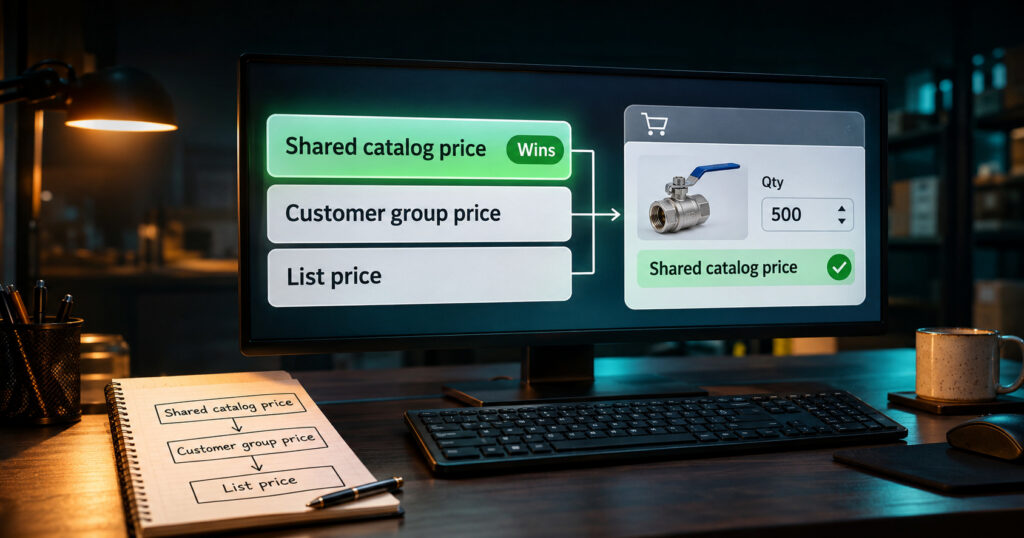
Every price rule has an order of precedence. The assistant must follow the platform’s order, not calculate its own. If it ignores the order, it quotes a price the cart will not honor.
Two documented examples show why. On Adobe Commerce B2B, custom shared-catalog pricing overrides customer-group pricing. On BigCommerce, a variant with its own price record skips product-level bulk pricing in the cart.
If you want the concept itself, see the piece on tiered B2B pricing. This guide only asks how each platform stores and exposes those rules.
Shopify’s help documentation describes catalogs per company. Basic, Grow, and Advanced allow 3 active catalog assignments, while Plus has no limit and can assign catalogs to company locations. That matters only if you run many distinct company price sets.
Shopify’s Storefront API also takes the buyer’s company location. So an assistant can ask for prices as that buyer, not as an anonymous visitor.
On WooCommerce, tiered and customer-group pricing comes from extensions in the documented route. B2B & Wholesale Suite, for example, lists group prices and quantity tiers. The assistant must read whichever extension you run.
On Magento, the split between built-in and add-on tools is its own topic. The guide to Magento B2B extensions sorts that out edition by edition.
Here is a quick test. Pick one company, one part, and one quantity. Ask the store for the price, and see whether the answer comes from a rule you can name.
What if you are on Volusion or an older platform?
You can still start with a catalog assistant on Volusion, because the product data leaves the store as a file. Volusion documents a CSV product export and an XML API. Its status page showed all systems operational on 4 November 2026, and no end-of-life notice turned up.
Older stores differ, so check the export options on the store you run. ChatSKU can start from a PDF, Excel, or store catalog file, which suits an older platform.
The real question for an older store is different. Can the platform hold your price rules and spec fields as the catalog grows? If it cannot, a move may be worth weighing.
The store sits under the chat, so the store comes first. If a platform cannot hold your price rules or your specs as fields, an assistant has little to read. Virtina is an eCommerce web design and development company with more than 14 years of experience and 2,500+ projects.
It builds, redesigns, and moves stores, including Volusion stores moving to Shopify, WooCommerce, Magento, or BigCommerce. Its engineers lead the work. Its migration services are one route if a move makes sense. If you are unsure where your store stands, a free Store + Catalog Review is a simple first step.

How does ChatSKU connect to each platform?
ChatSKU reads each store through that platform’s own catalog access and takes a single script on the site. Here is how that looks on each platform, based on what chatsku.com states.
Shopify
ChatSKU authorizes through Shopify’s API authentication, then reads products, variants, and inventory through the Storefront API. It also pulls company, catalog, and price-list data for logged-in B2B buyers. Quote requests reach your team, your CRM, or draft orders. The script sits in your theme or Hydrogen app, as the Shopify B2B page describes.
BigCommerce
The BigCommerce B2B page says ChatSKU reads the Storefront API and B2B Edition API for accounts, price lists, and inventory. One script tag does the install, on Stencil, headless, and Catalyst builds. Quotes arrive with product, quantity, company account, and price list, as covered in BigCommerce quote requests.
WooCommerce
ChatSKU sits on top of WooCommerce and the B2B plugins you already run. The WooCommerce setup guide covers the steps. It reads SKUs, variants, custom attributes, and stock, plus plugin pricing rules, so check the plugin you run. Data comes through a CSV export, a direct connection, or REST sync, per the WooCommerce integration guide.
Magento and Adobe Commerce
ChatSKU reads the catalog through the standard Magento REST API on Open Source and Adobe Commerce, including Cloud. It follows customer-group prices, shared-catalog rules, and tier prices. On Adobe Commerce it also handles company accounts and negotiable quotes, as the Magento B2B page states.
Most teams go live the same day. Customer groups, tiered pricing, and store integration come with paid plans, not the free trial.
How do you choose?
Choose by four things, in this order: your catalog shape, your pricing rules, your team, and your budget. No platform wins on all four for every business.
Start with catalog shape. A catalog with many variants and attributes needs specs in fields. Ask whether each platform lets you keep them there.
Next come pricing rules. List your company-specific prices, your quantity breaks, and which one wins when they clash. The pricing section showed why that order matters.
Then look at your team. Someone has to maintain the store, and some paths need an extension or a developer. Weigh WooCommerce extensions and the Magento B2B module with that in mind.
Budget comes last. Count plan limits, paid extensions, and developer time, not just a platform fee. Then run the playbook below.
- Write down your three hardest price cases.
- Ask your platform vendor or developer the “check the docs” questions from the table.
- Test one company’s price on one part in the store.
- Pick the platform, or fix the foundation before adding the answer layer.
Foundation first, answer layer second. An assistant on clean, structured data can answer from it. On messy data it has nothing solid to work with.
People Also Ask
Which B2B platform is best for a catalog chatbot?
There is no single best one. The right platform depends on your catalog shape, pricing rules, team, and budget, and on what it lets an assistant read.
Do you need to switch platforms to add a catalog chatbot?
Usually not. The assistant reads the store you have. A move makes sense only if the platform cannot hold your price rules or product fields.
Can a catalog chatbot show customer-specific prices?
Yes, when the platform exposes those prices for the logged-in buyer. That is why price rules are one of the four needs.
Does Shopify have built-in B2B features?
Shopify’s help documentation describes B2B companies and catalogs on Basic, Grow, Advanced, and Plus. Check Shopify’s current docs for which feature sits on which plan.
Conclusion
There is no single best B2B store platform for a catalog assistant. Judge Shopify, BigCommerce, WooCommerce, and Magento on four needs: specs in fields, buyer-specific prices, API access with change events, and a quote handoff.
Fix the foundation first, then let the catalog talk. If you want a second opinion, a free Store + Catalog Review of your store and catalog is a simple first step. To see an assistant answer from your own catalog data, try the live demo.
Frequently asked questions
Most teams go live the same day. ChatSKU takes a single script on the site, and it reads your catalog through the platform or from catalog files. The quality of the answers depends on how clean your data is, not on the install.
No. Customer groups, tiered pricing, and store integration come with paid plans, not the free trial. The live demo is the place to ask how those features would work on your catalog.
No. ChatSKU reads the store you have, through the platform or from catalog files. A move is worth weighing only if your platform cannot hold your price rules or product specs. That is a decision about your store, not a requirement for the assistant.
In the documented route, tiered and customer-group pricing comes from extensions. The assistant has to read whichever extension you run, so confirm that one first. Ask how it exposes prices, then check the result against your own catalog.
ChatSKU can start from a PDF, Excel, or store catalog file. An older store such as Volusion can export a product file. Details depend on the store you run. Confirm them in the live demo.
For Shopify, BigCommerce, and Magento, ChatSKU says it reads company or customer-group prices for logged-in buyers. For WooCommerce, it depends on the pricing plugin you run. Check that plugin before you rely on it.
Turn your catalog into a 24/7 sales channel
