
Executive summary
Minimum order quantities and pack sizes aren’t the problem. They’re normal. They protect packaging costs, supplier terms, and freight math that don’t bend for one unit. The real problem is timing. Buyers hit these rules at the exact moment they’re deciding whether to buy. Nobody’s there to explain them.
A buyer wants 3. Your catalog sells a case of 12. If that number shows up late, or not at all, the buyer waits for a reply or leaves. You rarely see which one happened.
The fix isn’t loosening the rule. It’s answering it in the moment, using the buyer’s own account terms, before they close the tab. This post walks through why the rule exists, where it breaks down, and what answering it properly requires.
Introduction
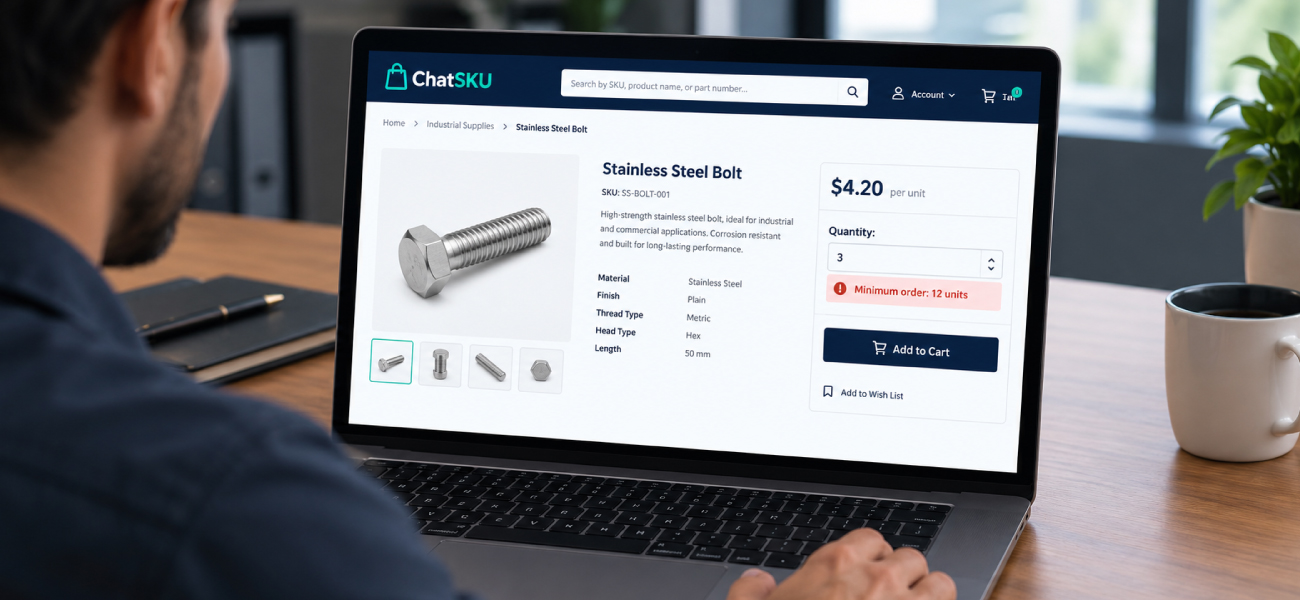
Picture a buyer on your site at 9pm. They need 3 units of a part. Your product page shows a price and an “add to cart” button. Nothing about a minimum.
They add 3 to the cart. Checkout rejects the order. Or it rounds up to 12 without warning. Or the site just says “unavailable” with no reason given. Maybe the minimum lives on a spec sheet they never opened. Maybe it’s different for their account and nobody said so.
Either way, the buyer now has a question your website can’t answer. Can I get 3? What does it cost if I can’t? Is there a smaller pack? They won’t dig through your site to find out. They’ll email, or they’ll leave.
This isn’t a pricing problem on its own, or a catalog problem on its own. It’s a timing problem. The rule is real. The silence around it is what’s costing you the sale.
Why do minimum order quantities exist at all?
They exist because small orders cost more to fill than they bring in. That’s the short answer, and it’s a fair one.
Packaging is usually built around a fixed case count. Breaking that case to sell 3 units means extra labor and extra materials. It also means a box that no longer matches what your supplier shipped you. Someone pays for that. Usually, it’s you, unless the price accounts for it.
Supplier terms work the same way. Many manufacturers set their own minimums upstream, and those terms flow down to what you can sell. You didn’t invent the rule. You inherited it.
Freight adds another layer. A single unit still ships in a box built for a case. The cost per unit climbs, sometimes past what the sale is worth. A minimum order quantity keeps that math from working against you.
None of this makes the rule wrong. It makes the rule worth explaining.
Where does the buyer actually hit the rule?
Usually at the worst possible point. It happens after they’ve already decided what they want.
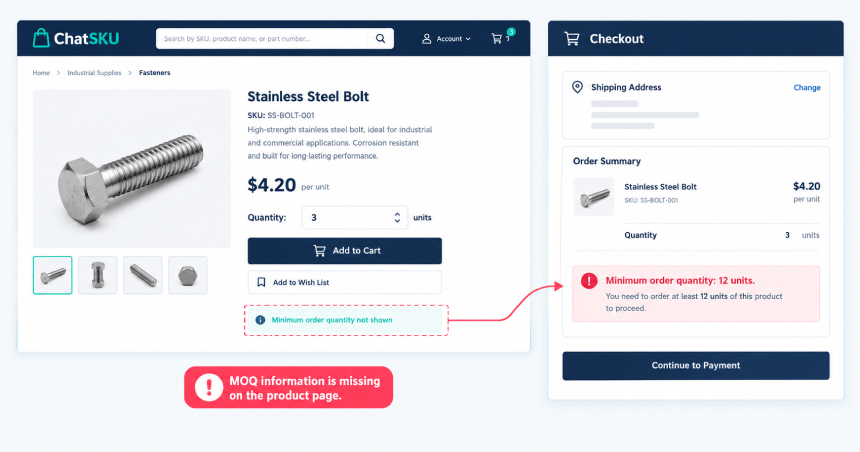
A buyer researches a part, compares it against two others, and settles on the one your catalog sells in a case of 12. They don’t know that yet. Nothing on the product page says so. They just see a price and a quantity box that accepts any number.
So they type 3. Then one of a few things happens. The cart quietly rounds up. The order gets rejected at checkout with no explanation. Or the site accepts it, and the mistake doesn’t surface until a rep calls to fix it later.
None of these moments happen where the buyer is actually deciding. They happen after the decision, once the buyer has already mentally committed and just wants the order placed. That’s the finding-to-buying gap at its most literal. The buyer found the part. They still can’t buy it the way they need to.
Worse, the minimum might not even be the same for every buyer. A long-term account might have a lower floor than a first-time buyer. If your site shows one static number, or none at all, it’s already wrong for someone.
Why isn't this just a labeling problem?
Because a label can only say one thing, and this rule isn’t one thing.
Minimum order quantity, pack size, and price breaks are three separate rules. A part might ship in a case of 12. It might also carry its own minimum order, and offer a better price at higher volume. Print all three on a static page and you’ve got a wall of numbers most buyers will skim past.
Now add accounts into it. Your tiered pricing by account already flexes by customer group and contract terms. The same logic applies to minimums. A long-term account might get a lower floor than a walk-up buyer. A static label can’t say “your minimum is different,” because it doesn’t know who’s reading it.
A label gives one answer to everyone. This rule needs one answer per buyer.
What does the buyer do when nobody answers?
Quietly, one of three things. None of them are good for you.
They email a rep and wait. Maybe they hear back the same day. Maybe not. Either way, the moment they were ready to buy has passed. Now the order depends on someone checking their inbox.
They call instead. That works, but it pulls a rep off other work to answer a question your site should have handled on its own.
Or they leave and order from whoever answers faster. You don’t get a notification for that one. No abandoned-cart email, no support ticket. The order just doesn’t happen, and you never know why.
Add that up across a full catalog and a full account list, and it’s not a small leak. Modeling what that leak costs makes the silence a lot less abstract.
What does answering it in the moment actually take?
It takes reading the data you already have, and applying it to the buyer standing in front of you.
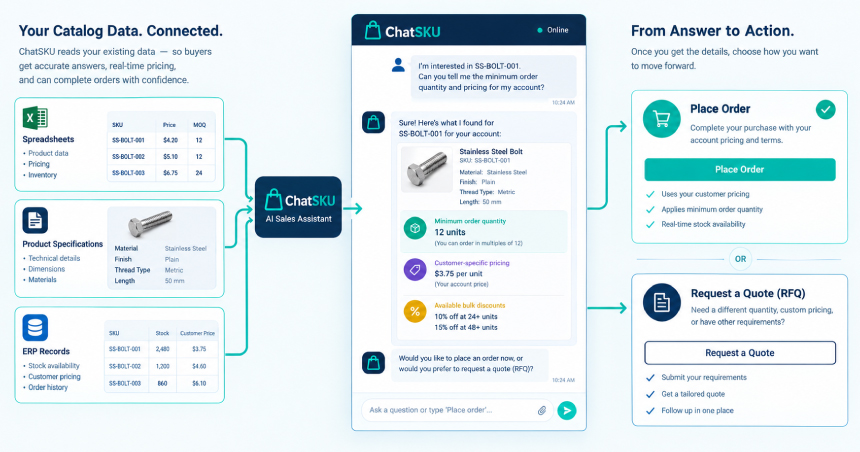
Your pack sizes, case counts, and minimums already live somewhere. A spec sheet, a spreadsheet export, an ERP field. ChatSKU reads your existing catalog files directly, including pack and unit-of-measure data, without asking you to rebuild anything or move that data somewhere new.
It applies the buyer’s own account rules to the answer. Not a generic minimum. Their minimum, based on their customer group and their pricing tier. If a better price break is close, it says so. A buyer who needs 3 deserves to know what a full case actually costs, before they check out, not after.
Then it turns the answer into action. If the buyer can order what they need, it builds the order. If they can’t, it starts a quote or an RFQ in the same conversation. No separate form, no waiting for a callback. A working quote workflow picks up exactly where the conversation left off.
None of this needs a new website. It deploys as one line of code on the site you already run, and it’s live in under a day. An AI sales assistant built this way doesn’t replace your team. It answers the quantity question before your team ever needs to.
What if the answer is no?
Sometimes the honest answer is that 3 isn’t happening. That’s fine. Say so fast.
A minimum order quantity is still a rule, and rules don’t bend because the answer is inconvenient. Nobody’s suggesting you sell 3 units of something built to ship in a case of 12. That would undo the whole reason the rule exists.
What changes is what happens next. Instead of silence, the buyer gets real options right away. Buy the full case. Step up to the next price break. Switch to a smaller pack size, if one exists. They can decide on the spot instead of waiting on an email that may or may not come.
Fast still wins here, even when the answer is no. A buyer who gets a clear “here’s what you can do instead” in seconds is far more likely to stay. One who gets nothing at all usually doesn’t. Answering buyers in real time means those options show up the moment the buyer asks, instead of losing them to the wait.
People also ask
What is a minimum order quantity in B2B sales?
It’s the smallest amount a supplier will sell in a single order. Suppliers set it to cover packaging, handling, and freight costs that don’t scale down cleanly for small orders.
Is minimum order quantity the same as pack size?
No. Pack size is how a product is packaged, like a case of 12. Minimum order quantity is the smallest order a supplier accepts. That can equal one pack, several packs, or a different number entirely.
Why do B2B buyers abandon orders over quantity rules?
Usually because they find out about the rule too late. By the time they see it, they’ve already decided what to buy, and nobody explains their options in the moment.
Conclusion
Minimum order quantities aren’t going anywhere, and they shouldn’t. What can change is the moment your buyer finds out about them. Answered fast, with their own account rules applied, a minimum order stops being a dead end. It becomes a normal part of the conversation.
See what that looks like on your own catalog.
Frequently asked questions
ChatSKU goes on your current site as a single line of code. Most stores go live within a day, since it reads your current catalog files instead of waiting on a rebuild.
No. Your current catalog files are enough, whether that’s a spec sheet, a spreadsheet export, or an ERP file. There’s no migration step before it can answer buyer questions.
Yes. It applies each buyer’s own customer group and tiered pricing to the answer. A contract account and a first-time buyer don’t see the same number for the same part.
No. It answers the quantity questions that don’t need a rep’s judgment. Your team spends its time on the accounts and deals that do.
It works with the catalog files you already maintain. Gaps in pack size or unit-of-measure data show up as gaps in the answer, the same way they would for a rep checking by hand.
Turn your catalog into a 24/7 sales channel
Stop sending PDFs. Start capturing demand.
Try ChatSKU Free →
About the author
Gigi JK is the founder of ChatSKU and Virtina, bringing more than 28 years of experience across digital transformation, eCommerce strategy, AI-driven growth systems, and business modernization. His work spans startups, scale-ups, and SMBs, with a focus on turning complex operational problems into practical growth frameworks. Before ChatSKU, Gigi built and scaled a seven-figure eCommerce business and led Virtina as an eCommerce engineering and business transformation consultancy. At ChatSKU, he focuses on helping B2B manufacturers, distributors, and wholesalers make complex catalogs searchable, quote-ready, and agent-ready without forcing a full platform rebuild.