


Executive Summary
Updated November 2026
B2B inquiry tracking starts with a seven-day count: tally every inquiry by door, then count how many exist as a shared record. The gap between those two counts is your unlogged inquiry rate.
The formula is simple. Counted inquiries minus recorded inquiries, divided by counted inquiries. Treat the result as a floor, because buyers who left without a word never appear in any tally.
The count takes one working week and no new software. Fix the door with the largest unlogged count first. A website AI catalog assistant records the conversations it handles, while phone and email need a process fix.
Introduction
Picture a Monday. The owner asks how many quote requests came in last week. The counter rep says, “A handful.” The inside sales manager says 19 came by email. The shared CRM shows 11.
That is three answers and no number anyone trusts. Nobody is lying. Each person is counting a different pile, and half the piles live in personal inboxes, notebooks, and memory.
You cannot fix what you have never counted. B2B inquiry tracking starts with one honest week of tallying. This article gives you the method, the math, and a way to pick the first door to fix.
What is an unlogged inquiry in B2B sales?
An unlogged inquiry is a buyer request that reached someone on your team but exists in no record that others can open.
An inquiry is any inbound message asking about a product, a price, or a quote. A door is a channel where buyers reach you, such as email, phone, a web form, or website chat. A shared record is an entry in a CRM, quote tool, or dashboard that anyone on the team can open.
A note in a personal inbox is not a shared record. Neither is a notebook, a sticky note, or a rep’s memory. A rep who answered every email can still score badly here.
This is the practical core of the black hole pipeline: demand goes in, and nobody can say what came out. The count turns that vague worry into a number.
How do you count B2B inquiries that never reach your CRM?
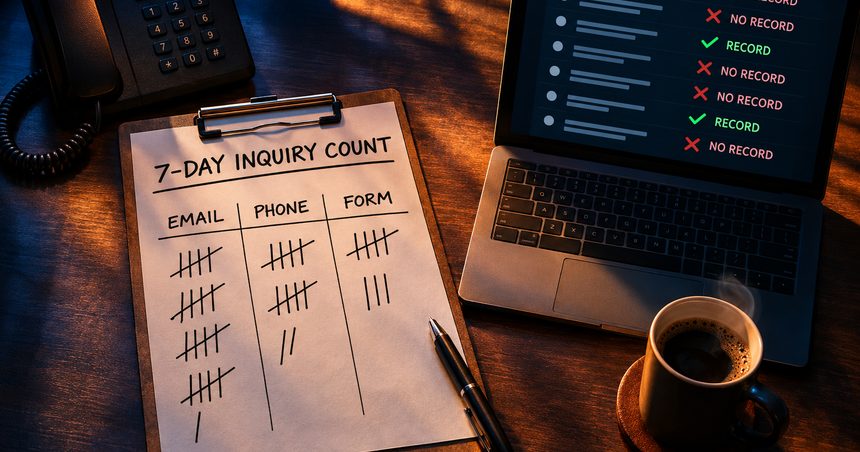
Tally every inbound inquiry by door for seven working days, then count how many exist as a shared record and score the gap.
The 7-Day Inquiry Count is a one-week tally-and-reconcile method that measures how much inbound demand has no shared record. Reconciliation just means checking your tally against what your systems actually hold.
Follow these five steps in order.
- Hand every person who receives buyer contact a tally sheet. Include the counter rep, inside sales, the owner’s own inbox, and whoever picks up the main line.
- Log one line per inquiry as it arrives. Write the day, the door, the product or question in a few words, and whether a quote was asked for.
- On day eight, search your shared system for each line. A CRM, quote tool, or shared spreadsheet all count.
- Mark each line “record” or “no record”. Be strict. If you cannot find it in two minutes, it has no record.
- Calculate the rate in the next section, then rank the doors by unlogged count.
Plan on about five minutes a day per person, plus about an hour to reconcile on day eight. That is an estimate, not a statistic. Your own team size will move it.
One warning. Do not announce this as an audit of people. Announce it as a count of doors. Reps who feel watched tally less, and then your baseline is wrong before you start.
What is the unlogged inquiry rate and how do you calculate it?
The unlogged inquiry rate is the share of counted inquiries with no shared record, calculated as counted minus recorded, divided by counted.
Here is the formula in plain text.
Unlogged inquiry rate = (inquiries counted – inquiries with a shared record) / inquiries counted
Two companion numbers help. The ownerless rate is the share of recorded inquiries with no named owner. The stale-stage count is the number of open quotes whose stage has not changed in seven days.
Illustrative example, not a benchmark
These numbers are invented to show the arithmetic. They describe no real company and set no standard.
Say a distributor counts 70 inquiries in one week. Only 29 have a shared record, so 41 do not. The rate is 41 divided by 70, which is about 59%. The split by door looks like this:
- Email: 41 counted, 16 with a record, so 25 unlogged.
- Phone, asking about a product: 17 counted, 2 with a record, so 15 unlogged.
- Web form: 12 counted, 11 with a record, so 1 unlogged.
- Total: 70 counted, 29 with a record, 41 unlogged, a rate of about 59%.
Notice the split. Email holds the largest unlogged pile at 25. Phone has the worst door rate, with 15 of 17 unlogged. Forms are nearly clean.
The loudest door and the leakiest door are not the same door. That is why you count by door and not in one lump.
What should a B2B inquiry record include?
A usable inquiry record holds five fields: source door, product or question, intent, owner, and quote stage.
Keep it short, or nobody will fill it in. Each field answers one question a manager will ask later.
- Source door. Email, phone, web form, or website chat. This tells you which door to fix.
- Product or question. A few words, such as “12-inch ball valve, bulk price”. This shows what buyers actually want.
- Intent. Browsing, comparing, or ready to quote. This is a working scale, not an industry standard.
- Owner. One named person who answers next. Your team assigns this. No software does it for you.
- Quote stage. New, quote open, quote sent, won, or lost.
Quote stage matters most after the first reply. What happens during the silence after the quote is a separate problem, and it is covered there. The record here only makes sure the inquiry exists to be followed.
Which door should you fix first?
Fix the door with the largest unlogged count first, because that is where the most unrecorded demand enters.
Use the count to decide, not your gut. The table shows what usually gets lost at each door, what the count tells you, and a sensible first fix.
| Door | What gets lost | What the count shows | First fix |
|---|---|---|---|
| RFQs with a PDF attached, replies to a rep who has left | Unlogged count per mailbox | Forward inquiry emails to one shared address and log them by end of day | |
| Phone | Repeat-customer orders, spec questions a counter rep answers | Often the highest door rate | A one-line call log at the desk, with an owner named |
| Web form | Submissions that land in one person’s inbox | Forms with no record | Route every form into the shared system |
| Website chat | Questions asked after hours | Conversations without a record | An AI catalog assistant records each conversation it handles as a dashboard entry |
The website door is the one ChatSKU covers. As an AI catalog assistant, it records each conversation it handles as a dashboard entry. Each entry records where the inquiry came from, which product the buyer asked about, how serious the buyer sounded, and where the quote stands. A complete RFQ goes to your team or CRM with the conversation attached. The AI sales assistant for B2B page explains how that works.
Phone and email stay a process fix. ChatSKU does not capture phone calls or read your inbox. The count simply shows you which of those two to tackle first. It connects to the systems you already run, as listed under ChatSKU integrations.
If you are unsure what separates an assistant from a basic widget, see this comparison of an AI sales agent vs chatbot. It is a different question from the one you are answering this week.
Events add a temporary fifth door for a few weeks a year. Those trade show open questions deserve their own count, so keep them out of this one.

What can the 7-day count not see?
The count cannot see buyers who left without contacting anyone, so your unlogged inquiry rate is a floor, not the full loss.
Some demand never touches a door. A voicemail that nobody returned may not be on anyone’s tally. Mail sent to a rep who left sits unread. The visitor who browsed your catalog at 9pm and closed the tab left no trace at all.
So read your rate as the minimum. The true gap is at least that wide, and probably wider.
One blind spot does narrow. A visitor who asks the website assistant a question becomes a record, even after hours. That removes one silent exit, though not the others.
Once you have a rate, price it. Put your own average deal size into the ROI calculator and see what the gap could cost. That math is yours, not a benchmark.
The count also gives you the plain version of the pipeline visibility problem. You now know where to look, and you know it is a floor.
People Also Ask
How do you track B2B inquiries that come in by phone and email?
Log each one at the door as it arrives, then check it against the shared record on day eight. A one-line call log and a shared inbox rule are enough to start. The goal is a line on the tally, not a perfect system.
What is a good inquiry capture rate for a distributor or manufacturer?
No verified benchmark for inquiry capture rate exists for distributors or manufacturers, so set your own baseline in week one. Repeat the count monthly. Aim to move your own number, not to match anyone else’s.
How long does a 7-day inquiry audit take?
It takes seven working days of tallying, about five minutes a day per person. Plan on about an hour to reconcile on day eight. That is an estimate, not a statistic, and it grows with team size.
Can an AI catalog assistant log inquiries automatically?
It records the website conversations and quote requests it handles, with source, product interest, intent signals, and quote status. It does not capture phone calls or inbox mail. Those doors still need a process fix.
Conclusion
Run the count on Monday. On day eight, work out your unlogged inquiry rate. Rank the doors by unlogged count and close the biggest one first.
Then repeat the count to see if the number moved. For the website door, an AI catalog assistant records each conversation it handles, so one door stops leaking.
Frequently asked questions
Assign one named role per door before the count starts. Owners can change later. A door with no owner will always leak.
Four answers in 60 seconds. How many inquiries came in this week, how many have a quote open, how many open quotes are older than seven days, and which door each came through. If you cannot answer all four, your records have gaps.
No. ChatSKU records the conversations it handles on your website. Phone and email need a process fix, which the count helps you rank.
No. A shared spreadsheet that everyone can open counts as a shared record. A personal inbox does not. The test is simple: can a teammate find the entry without asking you?
Repeat it after each fix, then monthly. Compare your rate against your own week-one baseline, not against anyone else’s number. A falling rate means the fixes are working.
Turn your catalog into a 24/7 sales channel
